Vyos 1.4 - Ipv6 traffic passing from one BGP peer to another peer

I have a Vyos router

I have an Ubuntu server running bird6

I have a cisco 540

Vyos is the filter between the internet and my server running bird6

I have BGP peering working between all parties

I can see routes for default route, and the routes directly connected and routes from my bird6 host.

But when i try to ping something on the internet the traffic dies at the vyos router.

I know this because

In Vyos:

Eth3 - Goes to my 540
Eth5 - Goes to my BIRD6

If the Bird6 host pings google’s v6 address

I run a tcpdump -i eth5 icmp6

I see traffic

If i run tcpdump -i eth3 icmp6

I do not see traffic

If something from the internet pings my Bird6 host

Same thing in reverse i see traffic on eth5 but i do not on eth3

I’m stuck

I have this exact setup in another location and it works config on vyos match exactly with firewall rules. If i dig down to ip6tables i see that one rule is called later then the other but i don’t see a block between that would tell me this isn’t going to allow the traffic.

Help please.

Please post relevant config snippets, exact version numbers etc. All the sort of details you’d expect.
People can’t guess your config :slight_smile:

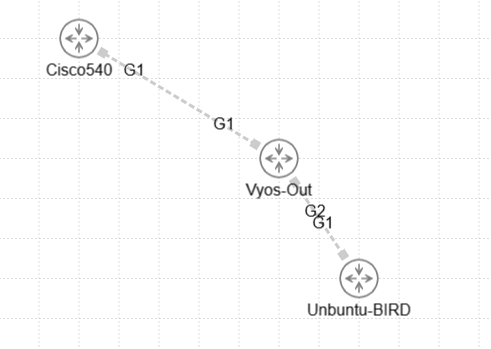
You can see the links above i mocked it up quickly in CML

VyOS-Out:~$ show interfaces

Codes: S - State, L - Link, u - Up, D - Down, A - Admin Down
Interface    IP Address         MAC  VRF      MTU  S/L  Description
-----------  -----------------  ---  -------  ---  ---  -----------
eth3         X.X.X.54/30         n/a  default  n/a  u/u  WAN
             X:X:a120:7::3/64
eth4         172.26.0.102/30     n/a  default  n/a  u/u  LAN
eth5         X.X.X.85/30         n/a  default  n/a  u/u  DMZ
             X:x:a120:9::2/64
lo           127.0.0.1/8         n/a  default  n/a  u/u
             ::1/128

Real config up top shows the WAN interface going to the 540 and the DMZ going toward the Ubuntu-BIRD host

Now i have zone-policy zones setup for each DMZ and WAN and i have address-group and ipv6-address-group setup for the endpoints behind UBUNTU

I have firewall ipv6-name rules

set firewall ipv6-name to-DMZ-from-LOCAL6 default-action 'accept'
set firewall ipv6-name to-DMZ-from-WANv6-1 default-action 'accept'
set firewall ipv6-name to-DMZ-from-WANv6-1 rule 80 action 'accept'
set firewall ipv6-name to-DMZ-from-WANv6-1 rule 80 description 'DNS from ANY to AnyCastv6 Group'
set firewall ipv6-name to-DMZ-from-WANv6-1 rule 80 destination group address-group 'AnyCastv6'
set firewall ipv6-name to-DMZ-from-WANv6-1 rule 80 destination port '53'
set firewall ipv6-name to-DMZ-from-WANv6-1 rule 80 protocol 'udp'

to allow DNZ queries to my Ubuntu-BIrd server

set zone-policy zone DMZ from WAN firewall ipv6-name 'to-DMZ-from-WANv6-1'

Now lets talk about routing

vyos@Vyos-Out:\~$ show ipv6 route bgp
Codes: K - kernel route, C - connected, S - static, R - RIPng,
O - OSPFv3, I - IS-IS, B - BGP, N - NHRP, T - Table,
v - VNC, V - VNC-Direct, A - Babel, D - SHARP, F - PBR,
f - OpenFabric,
> - selected route, \* - FIB route, q - queued route, r - rejected route

B>\* ::/0 \[20/0\] via fe80::b64c:90ff:fe30:ef85, eth3, 00:59:50
B>\* X:X:a100:1::7/128 \[20/0\] via fe80::250:56ff:feae:a823, eth5, 00:59:55
B>\* X:X:a101:1::7/128 \[20/0\] via fe80::250:56ff:feae:a823, eth5, 00:59:55

You can see Ubuntu i sending the anycast bind ip’s

vyos@Vyos-Out:\~$ show ipv6 route connected
Codes: K - kernel route, C - connected, S - static, R - RIPng,
O - OSPFv3, I - IS-IS, B - BGP, N - NHRP, T - Table,
v - VNC, V - VNC-Direct, A - Babel, D - SHARP, F - PBR,
f - OpenFabric,
> - selected route, \* - FIB route, q - queued route, r - rejected route

C>\* X:X:a120:7::/64 is directly connected, eth3, 01:02:04
C>\* X:X:a120:9::/64 is directly connected, eth5, 01:02:04
C \* fe80::/64 is directly connected, eth3, 01:02:04
C \* fe80::/64 is directly connected, eth4, 01:02:04
C \* fe80::/64 is directly connected, eth5, 01:02:05
C>\* fe80::/64 is directly connected, lo, 01:02:06

While connected routes are shared into vyos’ routing table

Anything else you might need to know?

Thanks for responding.

Firstly, my v6 knowledge is not great so I’ll probably not be able to help.
But secondly, put yourself in the shoes of someone who’s not you.
It’s still not really clear at all what’s going on, at least to me. There’s no BGP config shared, you have pulled out one firewall rule, that references an address-group you don’t show etc.
The diagram mentions G1/G2 - what are those?

Why have you shared DNS rules? You’re trying to ping, right, wouldn’t you show what rules (if any) you have for ICMPv6?
What version(s) exactly of VyOS are you using? LTS? Rolling? etc etc.

I know it’s exasperating to be working on a fault and some grumpy old man on the Internet keeps asking for information. But you need to put yourself in the shoes of everyone else who don’t have ANY idea of your current working setup, or rules, or anything. And then share (as much as possible) all that stuff.
And final tip, it’s best if you properly format your code as it make it much more readable.

I am in a spot of what can and can i not post on the internet

The image above was from my cisco modeling lab its not production

My issue is that DNS traffic going to my ubuntu server is not responding on v6 i can test it at the same time icmp6 isn’t working through the vyos-out server

and then at the same time icmp6 is not making its way through vyos out from eth3 to devices behind eth5

so i will take as much help as you got i don’t mind responding with more information.

i’m just lost as to why this isnt’ working but it works on another vyos-out server i have in another location

i’ve compared

show config commands between the two servers and they match minus ip changes and interface names and mac’s

ip6tables -L this on both servers match so there is nothing hanging in the os that could be a problem

Sorry I don’t past much on forums so code formatting is new to me.

Are you actually on 1.4, or are you on 1.3?

Vyos-Out:~$ show version

Version: VyOS 1.4-rolling-202101140417
Release Train: sagitta

Built by: autobuild@vyos.net
Built on: Thu 14 Jan 2021 04:17 UTC
Build UUID: 29fa3022-d820-438c-81d6-8dfdc50eeec9
Build Commit ID: ae2279e30b1222

You’re unfortunately going to have a hard time getting help if you:

  1. Are unable to share enough info to help people understand your problem and identify potential issues
  2. Are on a rolling release that is almost 5 years old.
    a. This is made worse by the specific version being around the time VyOS was migrating from iptables to nftables. You’re on 1.4, but most user’s understanding of 1.4 will have different syntax and firewall implementations than what you’re using.

The things to do are to enable the default log on your policies, and add a log to any drops that could be dropping the traffic. That will help you identify if the firewall is in fact dropping the traffic, and if so, what rule is dropping it.

After that, make sure ND is resolving as it could simply be a forwarding issue.

Install latest rolling and see if the issue remains there?

Or at least latest stream edition: