IPSec site-to-site no routes created

I’ve spend the last 4 hours trying to get a plain IPSec tunnel working between Vyos (rolling, 20260519) and our company firewall (Sophos).

set vpn ipsec interface pppoe0
set vpn ipsec ike-group IKE1 close-action start
set vpn ipsec ike-group IKE1 key-exchange ikev1
set vpn ipsec ike-group IKE1 lifetime 7800
set vpn ipsec ike-group IKE1 dead-peer-detection timeout 60
set vpn ipsec ike-group IKE1 dead-peer-detection action restart
set vpn ipsec ike-group IKE1 dead-peer-detection interval 15
set vpn ipsec ike-group IKE1 proposal 1 dh-group 5
set vpn ipsec ike-group IKE1 proposal 1 encryption aes256
set vpn ipsec ike-group IKE1 proposal 1 hash md5
set vpn ipsec ike-group IKE1 proposal 1 prf prfmd5
set vpn ipsec esp-group ESP1 lifetime 3600
set vpn ipsec esp-group ESP1 mode tunnel
set vpn ipsec esp-group ESP1 pfs disable
set vpn ipsec esp-group ESP1 proposal 1 encryption aes256
set vpn ipsec esp-group ESP1 proposal 1 hash md5
set vpn ipsec esp-group ESP1 compression
set vpn ipsec authentication psk PEER1 id 'firewall.xxxxxx'
set vpn ipsec authentication psk PEER1 secret-type plaintext
set vpn ipsec authentication psk PEER1 secret 'xxxxxxxx'
set vpn ipsec site-to-site peer PEER1 authentication mode pre-shared-secret
set vpn ipsec site-to-site peer PEER1 authentication local-id 'srvr2.xxxxxxx'
set vpn ipsec site-to-site peer PEER1 authentication remote-id 'firewall.xxxxxx'
set vpn ipsec site-to-site peer PEER1 local-address 'x.x.x.x'
set vpn ipsec site-to-site peer PEER1 remote-address 'x.x.x.x'
set vpn ipsec site-to-site peer PEER1 connection-type initiate
set vpn ipsec site-to-site peer PEER1 ike-group IKE1
set vpn ipsec site-to-site peer PEER1 default-esp-group ESP1
set vpn ipsec site-to-site peer PEER1 tunnel 0 local prefix 172.19.0.0/20
set vpn ipsec site-to-site peer PEER1 tunnel 1 local prefix fdfd:dead:beef:cafe:0:1::/108
set vpn ipsec site-to-site peer PEER1 tunnel 0 remote prefix 172.18.0.0/16
set vpn ipsec site-to-site peer PEER1 tunnel 1 remote prefix fdfd:dead:beef:cafe::/96

Tunnel comes up fine, nothing reported in the VyOS logs, nothing in the Sophos logs.

On the Sophos side I see a route appear in the routing table:

172.19.0.0/20 dev eth0 table ipsec proto ipsec scope link src 172.18.1.1 

But on the VyOS side nothing.

Some details:

vyos@srvr2-fw:~$ show vpn ipsec connections 
PPK Codes: none - Not Configured, opt - PPK is Optional, req - PPK is required, no - PPK not negotiated, yes - PPK negotiated
Connection      State    Type    Remote address    Local TS                       Remote TS                 Local id                     Remote id                       Proposal                           PPK
--------------  -------  ------  ----------------  -----------------------------  ------------------------  ---------------------------  ------------------------------  ---------------------------------  -------
PEER1           up       IKEv1   x.x.X.x           -                              -                         srvr2.xxxxxxxxxx             firewall.xxxxxxxxxx             AES_CBC/256/HMAC_MD5_96/MODP_1536  none/no
PEER1-tunnel-0  up       IPsec   x.x.x.x           172.19.0.0/20                  172.18.0.0/16             srvr2.xxxxxxxxxx             firewall.xxxxxxxxxx             AES_CBC/256/HMAC_MD5_96/None       -
PEER1-tunnel-1  up       IPsec   x.x.x.x           fdfd:dead:beef:cafe:0:1::/108  fdfd:dead:beef:cafe::/96  srvr2.xxxxxxxxxx             firewall.xxxxxxxxxx             AES_CBC/256/HMAC_MD5_96/None       -

vyos@esxr2-fw:~$ show vpn ipsec sa
Connection      State    Uptime    Bytes In/Out    Packets In/Out    Remote address    Remote ID                       Proposal
--------------  -------  --------  --------------  ----------------  ----------------  ------------------------------  -----------------------
PEER1-tunnel-0  up       13m9s     76K/10K         1K/265            95.154.239.68     firewall.xxxxxxxx               AES_CBC_256/HMAC_MD5_96
PEER1-tunnel-0  up       13m12s    445B/39B        9/1               95.154.239.68     firewall.xxxxxxxx               AES_CBC_256/HMAC_MD5_96
PEER1-tunnel-1  up       13m9s     0B/0B           0/0               95.154.239.68     firewall.xxxxxxxx               AES_CBC_256/HMAC_MD5_96
PEER1-tunnel-1  up       13m12s    0B/0B           0/0               95.154.239.68     firewall.xxxxxxxx               AES_CBC_256/HMAC_MD5_96
vyos@srvr2-fw:~$ show vpn ipsec policy 
src fdfd:dead:beef:cafe:0:1::/108 dst fdfd:dead:beef:cafe::/96 
        dir out priority 295551 ptype main 
        tmpl src x.x.x.x dst y.y.y.y
                proto comp spi 0x0000e211 reqid 1 mode tunnel
        tmpl src 0.0.0.0 dst 0.0.0.0
                proto esp spi 0xe4080ed9 reqid 1 mode transport
src fdfd:dead:beef:cafe::/96 dst fdfd:dead:beef:cafe:0:1::/108 
        dir fwd priority 295551 ptype main 
        tmpl src y.y.y.y dst x.x.x.x
                proto comp reqid 1 mode tunnel
                level use 
        tmpl src 0.0.0.0 dst 0.0.0.0
                proto esp reqid 1 mode transport
src fdfd:dead:beef:cafe::/96 dst fdfd:dead:beef:cafe:0:1::/108 
        dir in priority 295551 ptype main 
        tmpl src y.y.y.y dst x.x.x.x
                proto comp reqid 1 mode tunnel
                level use 
        tmpl src 0.0.0.0 dst 0.0.0.0
                proto esp reqid 1 mode transport
src 172.19.0.0/20 dst 172.18.0.0/16 
        dir out priority 381567 ptype main 
        tmpl src x.x.x.x dst y.y.y.y
                proto comp spi 0x00000459 reqid 2 mode tunnel
        tmpl src 0.0.0.0 dst 0.0.0.0
                proto esp spi 0x84f1abd3 reqid 2 mode transport
src 172.18.0.0/16 dst 172.19.0.0/20 
        dir fwd priority 381567 ptype main 
        tmpl src y.y.y.y dst x.x.x.x
                proto comp reqid 2 mode tunnel
                level use 
        tmpl src 0.0.0.0 dst 0.0.0.0
                proto esp reqid 2 mode transport
src 172.18.0.0/16 dst 172.19.0.0/20 
        dir in priority 381567 ptype main 
        tmpl src y.y.y.y dst x.x.x.x
                proto comp reqid 2 mode tunnel
                level use 
        tmpl src 0.0.0.0 dst 0.0.0.0
                proto esp reqid 2 mode transport
src 0.0.0.0/0 dst 0.0.0.0/0 
        socket in priority 0 ptype main 
src 0.0.0.0/0 dst 0.0.0.0/0 
        socket out priority 0 ptype main 
src 0.0.0.0/0 dst 0.0.0.0/0 
        socket in priority 0 ptype main 
src 0.0.0.0/0 dst 0.0.0.0/0 
        socket out priority 0 ptype main 
src ::/0 dst ::/0 
        socket in priority 0 ptype main 
src ::/0 dst ::/0 
        socket out priority 0 ptype main 
src ::/0 dst ::/0 
        socket in priority 0 ptype main 
src ::/0 dst ::/0 
        socket out priority 0 ptype main 

Other side reports:
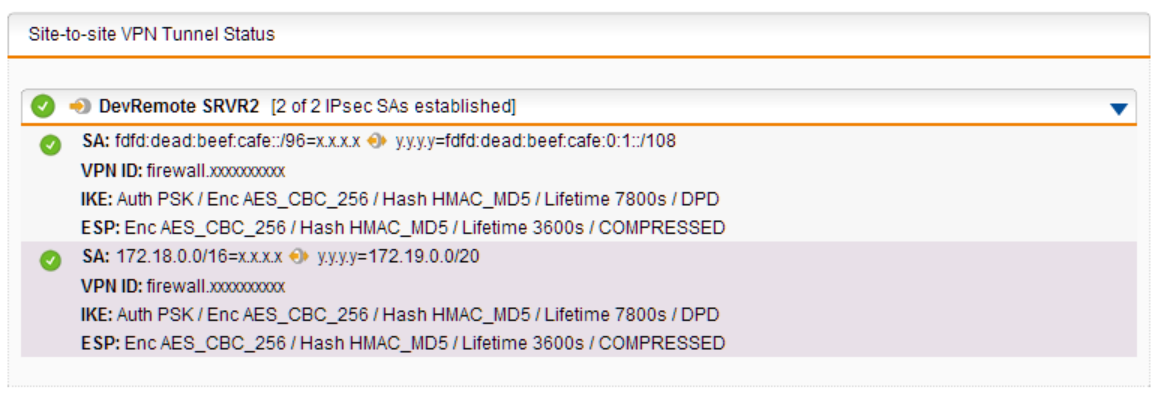
As there is no route, nothing goes through.

Grmpfff…

And now I find hidden in the log:

May 24 15:30:15 charon[10793]: 05[KNL] <PEER1|3> received netlink error: Nexthop has invalid gateway (101)
May 24 15:30:15 charon[10793]: 05[KNL] <PEER1|3> unable to install source route for 172.19.9.1

which I don’t understand, because that interface does exist:

vyos@srvr2-fw:~$ show interface ethernet eth2.1
eth2.1@eth2: <BROADCAST,MULTICAST,UP,LOWER_UP> mtu 1500 qdisc noqueue state UP group default qlen 1000
    link/ether 00:0c:29:fa:fc:6f brd ff:ff:ff:ff:ff:ff
    inet 172.19.9.1/24 brd 172.19.9.255 scope global eth2.1
       valid_lft forever preferred_lft forever
    inet6 fdfd:dead:beef:cafe:0:1:9:1/112 scope global 
       valid_lft forever preferred_lft forever
    inet6 fe80::20c:29ff:fefa:fc6f/64 scope link 
       valid_lft forever preferred_lft forever
    Description: Management

    RX:   bytes  packets  errors  dropped  overrun       mcast
         216463     2932       0        0        0          77
    TX:   bytes  packets  errors  dropped  carrier  collisions
          59458      702       0        0        0           0

Not sure why nexthop needs a gateway btw, this is a point-to-point tunnel for remote management.

And where does it get the IP 172.19.9.1 from? It is just one of the 7 interfaces of this router, and it isn’t configured anywhere as a “nexthop”?

Related to Unable to set source route if connection is established via PPPoE interface · Issue #2548 · strongswan/strongswan · GitHub ?

Adding the route to table 220 manually doesn’t fix the problem.

This is in the detailed log:

May 25 11:59:15 charon-systemd[102811]: adding policy 172.18.0.0/16 === 172.19.0.0/20 in [priority 381567, refcount 1]
May 25 11:59:15 charon-systemd[102811]: adding policy 172.18.0.0/16 === 172.19.0.0/20 fwd [priority 381567, refcount 1]
May 25 11:59:15 charon-systemd[102811]: adding policy 172.19.0.0/20 === 172.18.0.0/16 out [priority 381567, refcount 1]
May 25 11:59:15 charon-systemd[102811]: getting a local address in traffic selector 172.19.0.0/20
May 25 11:59:15 charon-systemd[102811]: using host 172.19.9.1
May 25 11:59:15 charon-systemd[102811]: getting iface name for index 18
May 25 11:59:15 charon-systemd[102811]: using <IP-of-remote> as nexthop and pppoe0 as dev to reach <IP-of-remote>/32
May 25 11:59:15 charon-systemd[102811]: installing route: 172.18.0.0/16 via <IP-of-remote> src 172.19.9.1 dev pppoe0
May 25 11:59:15 charon-systemd[102811]: getting iface index for pppoe0
May 25 11:59:15 charon-systemd[102811]: received netlink error: Nexthop has invalid gateway (101)
May 25 11:59:15 charon-systemd[102811]: unable to install source route for 172.19.9.1

Help?

The strongswan link suggests that adding the route manually would work, but if I do

sudo ip ro add 172.18.0.0/16 src 172.19.9.1 dev pppoe0 table 220

it isn’t picked up, packets still go out of the default gateway instead of into the tunnel.

The complete debug output:

vyos@srvr2-fw:~$ show vpn debug 
PEER1: IKEv1, reauthentication every 7800s, dpd delay 15s
  local:  <LOCAL-ENDPOINT>
  remote: <REMOTE-ENDPOINT>
  local pre-shared key authentication:
    id: <LOCAL-ID>
  remote pre-shared key authentication:
    id: <REMOTE-ID>
  PEER1-tunnel-0: TUNNEL, rekeying every 3272s, dpd action is start
    local:  172.19.0.0/20
    remote: 172.18.0.0/16
  PEER1-tunnel-1: TUNNEL, rekeying every 3272s, dpd action is start
    local:  fdfd:dead:beef:cafe:0:1::/108
    remote: fdfd:dead:beef:cafe::/96
PEER1: #1, ESTABLISHED, IKEv1, 89fdbbdc1c9e10cd_i* a498725a3160bb4f_r
  local  '<LOCAL-ID>' @ <LOCAL-ENDPOINT>[500]
  remote '<REMOTE-ID>' @ <REMOTE-ENDPOINT>[500]
  AES_CBC-256/HMAC_MD5_96/PRF_HMAC_MD5/MODP_1536
  established 167s ago, rekeying in 7163s
  PEER1-tunnel-0: #1, reqid 1, INSTALLED, TUNNEL, ESP:AES_CBC-256/HMAC_MD5_96
    installed 167s ago, rekeying in 2788s, expires in 3433s
    in  cd9d0256/2b43,  16655 bytes,   329 packets,     1s ago
    out d839ef7e/1f13,   2133 bytes,    55 packets,     3s ago
    local  172.19.0.0/20
    remote 172.18.0.0/16
  PEER1-tunnel-1: #2, reqid 2, INSTALLED, TUNNEL, ESP:AES_CBC-256/HMAC_MD5_96
    installed 167s ago, rekeying in 2781s, expires in 3433s
    in  cc127b7c/28d4,      0 bytes,     0 packets
    out 24f3f2b4/1e08,      0 bytes,     0 packets
    local  fdfd:dead:beef:cafe:0:1::/108
    remote fdfd:dead:beef:cafe::/96
src <LOCAL-ENDPOINT> dst <REMOTE-ENDPOINT>
        proto esp spi 0x24f3f2b4 reqid 2 mode transport
        replay-window 0 
        auth-trunc hmac(md5) 0x67314d1186110d694ea8144dd101f242 96
        enc cbc(aes) 0xe98dfad1fa1ff25829eef1dda0e6b134cecfec2f9374e139cfc15e28bb4bd462
        anti-replay context: seq 0x0, oseq 0x0, bitmap 0x00000000
        sel src 0.0.0.0/0 dst 0.0.0.0/0 
src <LOCAL-ENDPOINT> dst <REMOTE-ENDPOINT>
        proto comp spi 0x00001e08 reqid 2 mode tunnel
        replay-window 0 flag noecn nopmtudisc af-unspec
        comp deflate 
        anti-replay context: seq 0x0, oseq 0x0, bitmap 0x00000000
src <REMOTE-ENDPOINT> dst <LOCAL-ENDPOINT>
        proto esp spi 0xcc127b7c reqid 2 mode transport
        replay-window 32 
        auth-trunc hmac(md5) 0x05796eb0419db08dc57fe81a4e1cd520 96
        enc cbc(aes) 0x2521ea3c28f8830d5fdc0e8273a4f0a4a03a35301c0fcd7d1b9dd5bd663877fb
        anti-replay context: seq 0x0, oseq 0x0, bitmap 0x00000000
        sel src 0.0.0.0/0 dst 0.0.0.0/0 
src <REMOTE-ENDPOINT> dst <LOCAL-ENDPOINT>
        proto comp spi 0x000028d4 reqid 2 mode tunnel
        replay-window 0 flag noecn nopmtudisc af-unspec
        comp deflate 
        anti-replay context: seq 0x0, oseq 0x0, bitmap 0x00000000
src <LOCAL-ENDPOINT> dst <REMOTE-ENDPOINT>
        proto esp spi 0xd839ef7e reqid 1 mode transport
        replay-window 0 
        auth-trunc hmac(md5) 0xa0ccee25a48be90e526db62d4a6f6ea6 96
        enc cbc(aes) 0xbd80a71df3730b822b7ad3ccec5d81c432b839b013c75a68a1f726c732fa40fb
        lastused 2026-05-27 12:19:03
        anti-replay context: seq 0x0, oseq 0x37, bitmap 0x00000000
        sel src 0.0.0.0/0 dst 0.0.0.0/0 
src <LOCAL-ENDPOINT> dst <REMOTE-ENDPOINT>
        proto comp spi 0x00001f13 reqid 1 mode tunnel
        replay-window 0 flag noecn nopmtudisc af-unspec
        comp deflate 
        lastused 2026-05-27 12:19:03
        anti-replay context: seq 0x0, oseq 0x0, bitmap 0x00000000
src <LOCAL-ENDPOINT> dst <REMOTE-ENDPOINT>
        proto 4 spi 0xc2a4e3c0 reqid 0 mode tunnel
        replay-window 0 flag noecn nopmtudisc af-unspec
        anti-replay context: seq 0x0, oseq 0x0, bitmap 0x00000000
src <REMOTE-ENDPOINT> dst <LOCAL-ENDPOINT>
        proto esp spi 0xcd9d0256 reqid 1 mode transport
        replay-window 32 
        auth-trunc hmac(md5) 0x4141c9e7ecc69aba77851f351963a523 96
        enc cbc(aes) 0xe15ade7ad9f4fdf2fb5de93138bab67a0bece6711f4f568002ae825d4865369f
        lastused 2026-05-27 12:19:05
        anti-replay context: seq 0x149, oseq 0x0, bitmap 0xffffffff
        sel src 0.0.0.0/0 dst 0.0.0.0/0 
src <REMOTE-ENDPOINT> dst <LOCAL-ENDPOINT>
        proto comp spi 0x00002b43 reqid 1 mode tunnel
        replay-window 0 flag noecn nopmtudisc af-unspec
        comp deflate 
        lastused 2026-05-27 12:19:03
        anti-replay context: seq 0x0, oseq 0x0, bitmap 0x00000000
src <REMOTE-ENDPOINT> dst <LOCAL-ENDPOINT>
        proto 4 spi 0x5f9aef44 reqid 0 mode tunnel
        replay-window 0 flag noecn nopmtudisc af-unspec
        anti-replay context: seq 0x0, oseq 0x0, bitmap 0x00000000
src fdfd:dead:beef:cafe:0:1::/108 dst fdfd:dead:beef:cafe::/96 
        dir out priority 295551 ptype main 
        tmpl src <LOCAL-ENDPOINT> dst <REMOTE-ENDPOINT>
                proto comp spi 0x00001e08 reqid 2 mode tunnel
        tmpl src 0.0.0.0 dst 0.0.0.0
                proto esp spi 0x24f3f2b4 reqid 2 mode transport
src fdfd:dead:beef:cafe::/96 dst fdfd:dead:beef:cafe:0:1::/108 
        dir fwd priority 295551 ptype main 
        tmpl src <REMOTE-ENDPOINT> dst <LOCAL-ENDPOINT>
                proto comp reqid 2 mode tunnel
                level use 
        tmpl src 0.0.0.0 dst 0.0.0.0
                proto esp reqid 2 mode transport
src fdfd:dead:beef:cafe::/96 dst fdfd:dead:beef:cafe:0:1::/108 
        dir in priority 295551 ptype main 
        tmpl src <REMOTE-ENDPOINT> dst <LOCAL-ENDPOINT>
                proto comp reqid 2 mode tunnel
                level use 
        tmpl src 0.0.0.0 dst 0.0.0.0
                proto esp reqid 2 mode transport
src 172.19.0.0/20 dst 172.18.0.0/16 
        dir out priority 381567 ptype main 
        tmpl src <LOCAL-ENDPOINT> dst <REMOTE-ENDPOINT>
                proto comp spi 0x00001f13 reqid 1 mode tunnel
        tmpl src 0.0.0.0 dst 0.0.0.0
                proto esp spi 0xd839ef7e reqid 1 mode transport
src 172.18.0.0/16 dst 172.19.0.0/20 
        dir fwd priority 381567 ptype main 
        tmpl src <REMOTE-ENDPOINT> dst <LOCAL-ENDPOINT>
                proto comp reqid 1 mode tunnel
                level use 
        tmpl src 0.0.0.0 dst 0.0.0.0
                proto esp reqid 1 mode transport
src 172.18.0.0/16 dst 172.19.0.0/20 
        dir in priority 381567 ptype main 
        tmpl src <REMOTE-ENDPOINT> dst <LOCAL-ENDPOINT>
                proto comp reqid 1 mode tunnel
                level use 
        tmpl src 0.0.0.0 dst 0.0.0.0
                proto esp reqid 1 mode transport
src 0.0.0.0/0 dst 0.0.0.0/0 
        socket in priority 0 ptype main 
src 0.0.0.0/0 dst 0.0.0.0/0 
        socket out priority 0 ptype main 
src 0.0.0.0/0 dst 0.0.0.0/0 
        socket in priority 0 ptype main 
src 0.0.0.0/0 dst 0.0.0.0/0 
        socket out priority 0 ptype main 
src ::/0 dst ::/0 
        socket in priority 0 ptype main 
src ::/0 dst ::/0 
        socket out priority 0 ptype main 
src ::/0 dst ::/0 
        socket in priority 0 ptype main 
src ::/0 dst ::/0 
        socket out priority 0 ptype main 
1: lo: <LOOPBACK,UP,LOWER_UP> mtu 65536 qdisc noqueue state UNKNOWN group default qlen 1000
    link/loopback 00:00:00:00:00:00 brd 00:00:00:00:00:00
    inet 127.0.0.1/8 scope host lo
       valid_lft forever preferred_lft forever
    inet6 fe80::200:ff:fe00:0/64 scope link 
       valid_lft forever preferred_lft forever
    inet6 ::1/128 scope host noprefixroute 
       valid_lft forever preferred_lft forever
2: eth0: <BROADCAST,MULTICAST,UP,LOWER_UP> mtu 1500 qdisc mq state UP group default qlen 1000
    link/ether 00:0c:29:fa:fc:5b brd ff:ff:ff:ff:ff:ff
    altname enp11s0
    altname ens192
    inet6 fe80::20c:29ff:fefa:fc5b/64 scope link 
       valid_lft forever preferred_lft forever
3: eth1: <NO-CARRIER,BROADCAST,MULTICAST,UP> mtu 1500 qdisc mq state DOWN group default qlen 1000
    link/ether 00:0c:29:fa:fc:65 brd ff:ff:ff:ff:ff:ff
    altname enp19s0
    altname ens224
    inet6 fe80::20c:29ff:fefa:fc65/64 scope link tentative 
       valid_lft forever preferred_lft forever
4: eth2: <BROADCAST,MULTICAST,UP,LOWER_UP> mtu 9000 qdisc mq state UP group default qlen 1000
    link/ether 00:0c:29:fa:fc:6f brd ff:ff:ff:ff:ff:ff
    altname enp27s0
    altname ens256
    inet6 fe80::20c:29ff:fefa:fc6f/64 scope link 
       valid_lft forever preferred_lft forever
5: pim6reg@NONE: <NOARP,UP,LOWER_UP> mtu 1452 qdisc noqueue state UNKNOWN group default qlen 1000
    link/pimreg 
6: eth2.1@eth2: <BROADCAST,MULTICAST,UP,LOWER_UP> mtu 1500 qdisc noqueue state UP group default qlen 1000
    link/ether 00:0c:29:fa:fc:6f brd ff:ff:ff:ff:ff:ff
    inet 172.19.9.1/24 brd 172.19.9.255 scope global eth2.1
       valid_lft forever preferred_lft forever
    inet6 fdfd:dead:beef:cafe:0:1:9:1/112 scope global 
       valid_lft forever preferred_lft forever
    inet6 fe80::20c:29ff:fefa:fc6f/64 scope link 
       valid_lft forever preferred_lft forever
7: eth2.2@eth2: <BROADCAST,MULTICAST,UP,LOWER_UP> mtu 9000 qdisc noqueue state UP group default qlen 1000
    link/ether 00:0c:29:fa:fc:6f brd ff:ff:ff:ff:ff:ff
    inet 172.19.10.1/24 brd 172.19.10.255 scope global eth2.2
       valid_lft forever preferred_lft forever
    inet6 fdfd:dead:beef:cafe:0:1:a:1/112 scope global 
       valid_lft forever preferred_lft forever
    inet6 fe80::20c:29ff:fefa:fc6f/64 scope link 
       valid_lft forever preferred_lft forever
8: eth2.3@eth2: <BROADCAST,MULTICAST,UP,LOWER_UP> mtu 9000 qdisc noqueue state UP group default qlen 1000
    link/ether 00:0c:29:fa:fc:6f brd ff:ff:ff:ff:ff:ff
    inet 172.19.11.1/24 brd 172.19.11.255 scope global eth2.3
       valid_lft forever preferred_lft forever
    inet6 fdfd:dead:beef:cafe:0:1:b:1/112 scope global 
       valid_lft forever preferred_lft forever
    inet6 fe80::20c:29ff:fefa:fc6f/64 scope link 
       valid_lft forever preferred_lft forever
9: eth2.4@eth2: <BROADCAST,MULTICAST,UP,LOWER_UP> mtu 9000 qdisc noqueue state UP group default qlen 1000
    link/ether 00:0c:29:fa:fc:6f brd ff:ff:ff:ff:ff:ff
    inet 172.19.12.1/24 brd 172.19.12.255 scope global eth2.4
       valid_lft forever preferred_lft forever
    inet6 fdfd:dead:beef:cafe:0:1:c:1/112 scope global 
       valid_lft forever preferred_lft forever
    inet6 fe80::20c:29ff:fefa:fc6f/64 scope link 
       valid_lft forever preferred_lft forever
10: eth2.6@eth2: <BROADCAST,MULTICAST,UP,LOWER_UP> mtu 1500 qdisc noqueue state UP group default qlen 1000
    link/ether 00:0c:29:fa:fc:6f brd ff:ff:ff:ff:ff:ff
    inet 172.19.14.1/24 brd 172.19.14.255 scope global eth2.6
       valid_lft forever preferred_lft forever
    inet6 fdfd:dead:beef:cafe:0:1:e:1/112 scope global 
       valid_lft forever preferred_lft forever
    inet6 fe80::20c:29ff:fefa:fc6f/64 scope link 
       valid_lft forever preferred_lft forever
11: eth2.7@eth2: <BROADCAST,MULTICAST,UP,LOWER_UP> mtu 9000 qdisc noqueue state UP group default qlen 1000
    link/ether 00:0c:29:fa:fc:6f brd ff:ff:ff:ff:ff:ff
    inet 172.19.15.1/24 brd 172.19.15.255 scope global eth2.7
       valid_lft forever preferred_lft forever
    inet6 fdfd:dead:beef:cafe:0:1:f:1/112 scope global 
       valid_lft forever preferred_lft forever
    inet6 fe80::20c:29ff:fefa:fc6f/64 scope link 
       valid_lft forever preferred_lft forever
13: vtun1: <POINTOPOINT,MULTICAST,NOARP,UP,LOWER_UP> mtu 1500 qdisc fq_codel state UNKNOWN group default qlen 500
    link/none 
    inet 172.19.0.1/24 scope global vtun1
       valid_lft forever preferred_lft forever
15: pppoe0: <POINTOPOINT,MULTICAST,NOARP,UP,LOWER_UP> mtu 1492 qdisc noqueue state UNKNOWN group default qlen 3
    link/ppp 
    inet <LOCAL-ENDPOINT> peer 195.191.219.12/32 scope global pppoe0
       valid_lft forever preferred_lft forever
    inet6 <LOCAL-ENDPOINT-IPV6> scope global dynamic mngtmpaddr proto kernel_ra 
       valid_lft 2591925sec preferred_lft 604725sec
    inet6 fe80::fd52:5cff:fe10:cfa/64 scope link 
       valid_lft forever preferred_lft forever
    inet6 fe80::91d7:310f:e977:51f6 peer fe80::2ee:abff:fef8:500/128 scope link 
       valid_lft forever preferred_lft forever
0:      from all lookup local
220:    from all lookup 220
32766:  from all lookup main
32767:  from all lookup default
default nhid 67 dev pppoe0 proto static metric 20 
172.19.0.0/24 dev vtun1 proto kernel scope link src 172.19.0.1 
172.19.9.0/24 dev eth2.1 proto kernel scope link src 172.19.9.1 
172.19.10.0/24 dev eth2.2 proto kernel scope link src 172.19.10.1 
172.19.11.0/24 dev eth2.3 proto kernel scope link src 172.19.11.1 
172.19.12.0/24 dev eth2.4 proto kernel scope link src 172.19.12.1 
172.19.14.0/24 dev eth2.6 proto kernel scope link src 172.19.14.1 
172.19.15.0/24 dev eth2.7 proto kernel scope link src 172.19.15.1 
<ISP-IP> dev pppoe0 proto kernel scope link src <LOCAL-ENDPOINT> 

### ipsec statusall ###

### swanctl -L ###

### swanctl -l ###

### swanctl -P ###

### ip x sa show ###

### ip x policy show ###

### ip tunnel show ###

### ip address ###

### ip rule show ###

### ip route | head -100 ###

### ip route show table 220 ###

I wonder if there is more going on.

I have an ipv4 forward rule that allows traffic from the local management network to the central management network (at the other side of the IPsec VPN) on port 22.

If I do a tcpdump on port 22 on the router, I see traffic incoming on the management VLAN interface from the management VM on port 22. But if I check the details of the firewall rules, it says it has seen zero packets. I have a default log on anything dropped, and there is nothing in the logs.

Could it be that because of the issues above, either ntables isn’t aware of the subnet on the other side of the tunnel, or that VyOS itself is not aware of the subnet, and therefor hasn’t generated the correct nftables rules?

edit:

If I check the output of “nft list ruleset”, and as far as I can see everything is there.

I have the DC subset (the remote of the IPSec tunnel) excluded from the masquerading on pppoe0, so it can’t a NAT issue?

set nat source rule 1 destination group network-group 'REF_NETNETDCINTERNETWO'
set nat source rule 1 exclude
set nat source rule 1 outbound-interface name 'pppoe0'
set nat source rule 6 description 'from Internal Networks to Internet'
set nat source rule 6 outbound-interface name 'pppoe0'
set nat source rule 6 translation address 'masquerade'

I really need help with this.

I see traffic coming in over the tunnel:

vyos@srvr2-fw:~$ tcpdump -n -s0 -p -i pppoe0  | grep 172.18
tcpdump: verbose output suppressed, use -v[v]... for full protocol decode
listening on pppoe0, link-type LINUX_SLL (Linux cooked v1), snapshot length 262144 bytes
11:03:40.098267 IP 172.18.8.90.38320 > 172.19.11.31.161:
11:03:40.172905 IP 172.18.8.90 > 172.19.11.31: ICMP echo request, id 7026, seq 1, length 508
11:03:40.562508 IP 172.18.8.90.38320 > 172.19.11.31.161:
11:03:40.924391 IP 172.18.8.90 > 172.19.11.31: ICMP echo request, id 7026, seq 3, length 508
11:03:41.674928 IP 172.18.8.90 > 172.19.11.31: ICMP echo request, id 7026, seq 5, length 508
11:03:42.425771 IP 172.18.8.90 > 172.19.11.31: ICMP echo request, id 7026, seq 7, length 508
11:03:43.176611 IP 172.18.8.90 > 172.19.11.31: ICMP echo request, id 7026, seq 9, length 508

But I don’t see anything returning.

Even with the manually added route in place, If I try to ping an address on the other side of the tunnel, I don’t see it arrive on the interface.

I have removed all source nat rules to rule out any issues there, but that doesn’t change anything.

I see the ping arrive on the LAN interface of the router:

vyos@srvr2-fw:~$ tcpdump -n -s0 -p -i eth2.7 | grep 172.18
tcpdump: verbose output suppressed, use -v[v]... for full protocol decode
listening on eth2.7, link-type EN10MB (Ethernet), snapshot length 262144 bytes
11:07:19.529005 IP 172.19.15.52 > 172.18.1.1: ICMP echo request, id 34035, seq 1, length 64
11:07:20.590181 IP 172.19.15.52 > 172.18.1.1: ICMP echo request, id 34035, seq 2, length 64

but it doesn’t arrive on pppoe0, suggesting a routing problem, so adding the route manually as suggested in the github issue

sudo ip route add 172.18.0.0/16 src 172.19.9.1 dev pppoe0 table 220

isn’t the solution. Altough everything looks ok:

vyos@srvr2-fw:~$ ip route show table 220
172.18.0.0/16 dev pppoe0 scope link src 172.19.9.1 

vyos@srvr2-fw:~$ ip route get 172.18.1.1
172.18.1.1 dev pppoe0 table 220 src 172.19.9.1 uid 1002 
    cache 

If I ping from the router itself, I see the packets in the log:

[81057.171380] [ipv4-OUT-filter-default-A]IN= OUT=pppoe0 SRC=172.19.9.1 DST=172.18.1.1 LEN=84 TOS=0x00 PREC=0x00 TTL=64 ID=24873 DF PROTO=ICMP TYPE=8 CODE=0 ID=47029 SEQ=1 
[81058.233325] [ipv4-OUT-filter-default-A]IN= OUT=pppoe0 SRC=172.19.9.1 DST=172.18.1.1 LEN=84 TOS=0x00 PREC=0x00 TTL=64 ID=25933 DF PROTO=ICMP TYPE=8 CODE=0 ID=47029 SEQ=2 
[81059.257355] [ipv4-OUT-filter-default-A]IN= OUT=pppoe0 SRC=172.19.9.1 DST=172.18.1.1 LEN=84 TOS=0x00 PREC=0x00 TTL=64 ID=26888 DF PROTO=ICMP TYPE=8 CODE=0 ID=47029 SEQ=3 

but I don’t see them in the tcpdump of the pppoe0 interface.

I’m stuck now, without this tunnel I have to abandon this project, and find a new solution, 5 weeks before my deadline… :weary_face:

I’m pulling my last few hairs out at the moment.

In the output above, 172.18.8.90 is our Zabbix monitoring system. It uses an ICMP ping to 172.19.9.1 to check if the tunnel is up and and the remote server is reachable.

And guess what? Even those the tcpdump doesn’t show any response packets, and I can not do a “ping 172.19.9.1” from the CLI of the zabbix server

[root@zabbix1 ~]# ping 172.19.11.31
PING 172.19.11.31 (172.19.11.31) 56(84) bytes of data.
^C
--- 172.19.11.31 ping statistics ---
2 packets transmitted, 0 received, 100% packet loss, time 1036ms

[root@zabbix1 ~]# ping 172.19.9.1
PING 172.19.9.1 (172.19.9.1) 56(84) bytes of data.
^C
--- 172.19.9.1 ping statistics ---
3 packets transmitted, 0 received, 100% packet loss, time 2032ms

Zabbix icmpping itself finds it online, and tcpdump on the zabbix servers shows:

13:21:32.949412 IP 172.18.8.90 > 172.19.9.1: ICMP echo request, id 15825, seq 3, length 508
13:21:32.970446 IP 172.19.9.1 > 172.18.8.90: ICMP echo reply, id 15825, seq 3, length 508
13:21:33.699904 IP 172.18.8.90 > 172.19.9.1: ICMP echo request, id 15825, seq 4, length 508
13:21:33.720430 IP 172.19.9.1 > 172.18.8.90: ICMP echo reply, id 15825, seq 4, length 508

and even more weird, there is a NAS system running at 172.19.11.31, external to the router, out on interface eth2.3. And that also responds:

13:21:42.995409 IP 172.18.8.90 > 172.19.11.31: ICMP echo request, id 15837, seq 7, length 508
13:21:43.016735 IP 172.19.11.31 > 172.18.8.90: ICMP echo reply, id 15837, seq 7, length 508
13:21:43.746206 IP 172.18.8.90 > 172.19.11.31: ICMP echo request, id 15837, seq 9, length 508
13:21:43.768426 IP 172.19.11.31 > 172.18.8.90: ICMP echo reply, id 15837, seq 9, length 508

which suggests routing is working fine?

I an truely stomped, what the F is going on here?

Nothing else gets through (SMNP, connections to Zabbix agents, etc), and there are no firewall log entries (as said, I have a default log and default drop on the forward chain, and only accept rules, so everything not matching a rule should be logged).

You think it was already weird, guess what?

This doesn’t work (from the remote tunnel endpoint):

<M> firewall:/root # ping 172.19.11.31
PING 172.19.11.31 (172.19.11.31) 56(84) bytes of data.
^C
--- 172.19.11.31 ping statistics ---
2 packets transmitted, 0 received, 100% packet loss, time 1006ms

But this does:

<M> firewall:/root # ping 172.19.11.31 -s 500
PING 172.19.11.31 (172.19.11.31) 500(528) bytes of data.
508 bytes from 172.19.11.31: icmp_seq=1 ttl=63 time=24.4 ms
508 bytes from 172.19.11.31: icmp_seq=2 ttl=63 time=20.7 ms
508 bytes from 172.19.11.31: icmp_seq=3 ttl=63 time=20.8 ms

Turns out, only ping packets larger than 288 bytes get through.

<M> firewall:/root # ping 172.19.11.31 -s 287
PING 172.19.11.31 (172.19.11.31) 287(315) bytes of data.
^C
--- 172.19.11.31 ping statistics ---
2 packets transmitted, 0 received, 100% packet loss, time 1001ms

<M> firewall:/root # ping 172.19.11.31 -s 288
PING 172.19.11.31 (172.19.11.31) 288(316) bytes of data.
296 bytes from 172.19.11.31: icmp_seq=1 ttl=63 time=20.6 ms

Why? What is going on there?

p.s. note that is from remote to local only, if I try a ping the other way around, nothing gets through, regardless of the payload size.

Issue is firewall related, when I do

delete firewall
commit

pings start working. Now starting the tedious process of adding 1 rule at the time to find the culprit.

Created ⚓ T8942 Strongswan 5.x can not create a route when using a point-to-point tunnel (policy routing) for the (now unrelated) route issue that started this topic.

Ping stops when I execute:

set firewall ipv4 input filter default-action 'drop'

and it does not resume when I add

set firewall ipv4 input filter rule 6 description 'IMCP to the firewall'
set firewall ipv4 input filter rule 6 action jump
set firewall ipv4 input filter rule 6 jump-target INPUT-4-RULE000006
set firewall ipv4 name INPUT-4-RULE000006 default-action return
set firewall ipv4 name INPUT-4-RULE000006 rule 1 protocol icmp
set firewall ipv4 name INPUT-4-RULE000006 rule 1 action accept

so I clearly do something wrong, but have no clue what?

More debugging.

I’ve got a continuous ping running from from the remote tunnel endpoint to the NAS on the local LAN on eth2.3:

<M> firewall:/root # ping 172.19.11.31
PING 172.19.11.31 (172.19.11.31) 56(84) bytes of data.
64 bytes from 172.19.11.31: icmp_seq=1 ttl=63 time=20.3 ms
64 bytes from 172.19.11.31: icmp_seq=2 ttl=63 time=21.6 ms

source IP for this ping is 172.18.1.1.

This is the complete firewall config at the moment:

vyos@srvr2-fw:~$ show configuration commands | grep firewall
set firewall ipv4 forward filter default-log
set firewall ipv4 forward filter rule 6 action 'jump'
set firewall ipv4 forward filter rule 6 description 'IMCP through the firewall'
set firewall ipv4 forward filter rule 6 jump-target 'FORWARD-4-RULE000006'
set firewall ipv4 input filter default-log
set firewall ipv4 input filter rule 6 action 'jump'
set firewall ipv4 input filter rule 6 description 'IMCP to the firewall'
set firewall ipv4 input filter rule 6 jump-target 'INPUT-4-RULE000006'
set firewall ipv4 name FORWARD-4-RULE000006 default-action 'return'
set firewall ipv4 name FORWARD-4-RULE000006 rule 1 action 'accept'
set firewall ipv4 name FORWARD-4-RULE000006 rule 1 protocol 'icmp'
set firewall ipv4 name INPUT-4-RULE000006 default-action 'return'
set firewall ipv4 name INPUT-4-RULE000006 rule 1 action 'accept'
set firewall ipv4 name INPUT-4-RULE000006 rule 1 protocol 'icmp'
set firewall ipv4 output filter default-log

I would expect this ping to hit the forward chain of the router. However, if I check the statistics, I don’t see the rule packet counter incrementing with a packet per second:

ipv4 Firewall "name FORWARD-4-RULE000006"

Rule       Packets    Bytes  Action    Source    Destination    Inbound-Interface    Outbound-interface
-------  ---------  -------  --------  --------  -------------  -------------------  --------------------
1                4      532  accept    any       any            any                  any
default       1306   101058  return    any       any            any                  any

so there is clearly an issue with traffic coming through the tunnel and hitting the firewall.

I checked NAT statistics (both source and destination) but those rules are not hit by the ping, so it is not a NAT issue.

This is confirmed because when I change the default action from “accept” to “drop”, the ping stops.

Note that I have default-log active, so I’d expect packets that don’t match a rule to show up in the log, but I don’t see that ping there either.

So, what is going on here, why, and how to fix it?

Ok, someone needs to explain this to me like I am a 2 year old.

I have:

remote firewall -> IPSec tunnel -> VyOS -> eth2.3 -> NAS

remote: 172.18.8.1
eth 2.3: 172.19.11.1
NAS: 172.19.11.31

When I run a ping from 172.18.8.1 to 172.19.11.31 (which clearly goes through the VyOS router), and I do

set firewall ipv4 forward filter default-action 'drop'

the ping continues running without issues, but if I do

set firewall ipv4 input filter default-action 'drop'

the ping stops? Why is traffic arriving through the IPSec tunnel hitting the input chain, not the forward chain?

On the NAS I see

oot@nas03:~# tcpdump -n -i eth1 not port 22
tcpdump: verbose output suppressed, use -v[v]... for full protocol decode
listening on eth1, link-type EN10MB (Ethernet), snapshot length 262144 bytes
12:51:25.335766 IP 172.18.1.1 > 172.19.11.31: ICMP echo request, id 6484, seq 1, length 64
12:51:25.335800 IP 172.19.11.31 > 172.18.1.1: ICMP echo reply, id 6484, seq 1, length 64
12:51:26.337656 IP 172.18.1.1 > 172.19.11.31: ICMP echo request, id 6484, seq 2, length 64
12:51:26.337690 IP 172.19.11.31 > 172.18.1.1: ICMP echo reply, id 6484, seq 2, length 64
12:51:27.339595 IP 172.18.1.1 > 172.19.11.31: ICMP echo request, id 6484, seq 3, length 64
12:51:27.339629 IP 172.19.11.31 > 172.18.1.1: ICMP echo reply, id 6484, seq 3, length 64

and I see the same on the remote firewall if I ping in the opposite direction, so there is definitely no NAT involved somewhere.

If I reduce the firewall config to

set firewall ipv4 forward filter default-action 'accept'
set firewall ipv4 forward filter default-log
set firewall ipv4 input filter default-action 'accept'
set firewall ipv4 input filter default-log
set firewall ipv4 output filter default-action 'accept'
set firewall ipv4 output filter default-log

I see this in the log:

May 30 12:28:32 kernel: [ipv4-FWD-filter-default-A]IN=pppoe0 OUT=eth2.3 MAC= SRC=172.18.1.1 DST=172.19.11.31 LEN=84 TOS=0x00 PREC=0x00 TTL=63 ID=18410 DF PROTO=ICMP TYPE=8 CODE=0 ID=46414 SEQ=1 

which clearly says FWD, not INP?

I am utterly flabergasted by this.

Well, that was a waste of a few days.

Turned out there were two issues:

  • one of the firewall named rules was missing a ‘default-action return’
  • besides ESP and UDP 4500,500 you also need to allow IPENCAP in (protocol 4), this isn’t mentioned anywhere.

Traffic is flowing now, remains the original issue of the missing route, for which I created ⚓ T8942 Strongswan 5.x can not create a route when using a point-to-point tunnel (policy routing)